
Data Flow: From Upload to Rendered Review
This page traces the complete lifecycle of a document review through the dashboard, from file upload through provider analysis to rendered results.
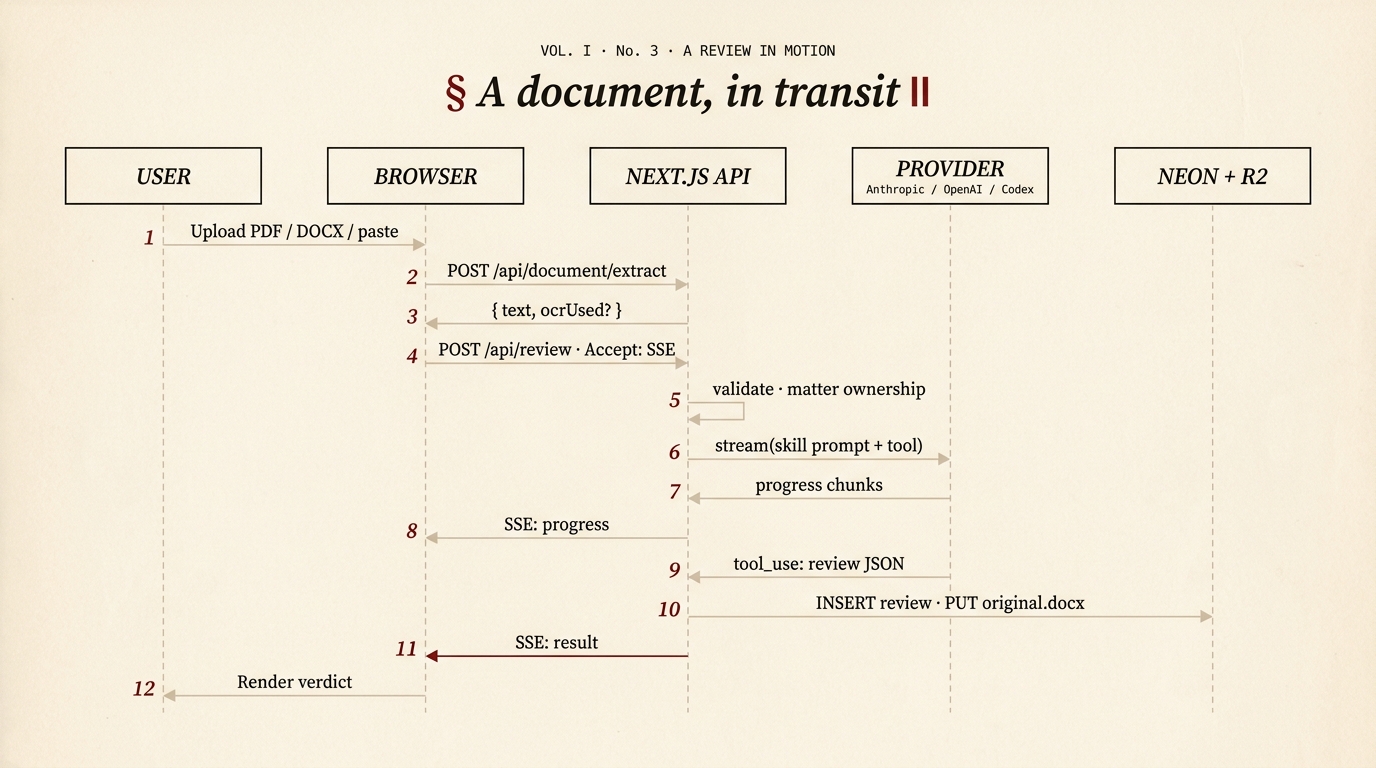
Figure 1 — the 2026 sequence diagram.
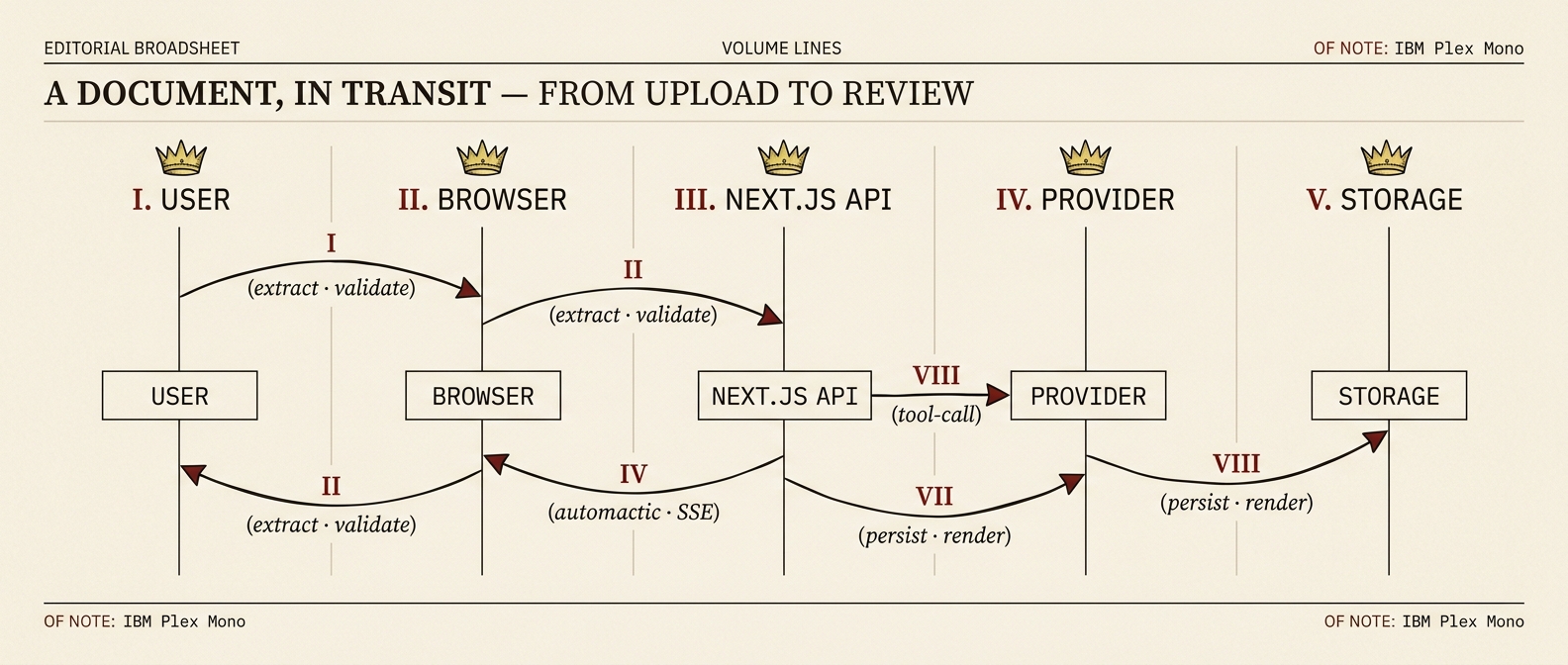
Figure 1.a — the broadsheet rebrand of the older framing.
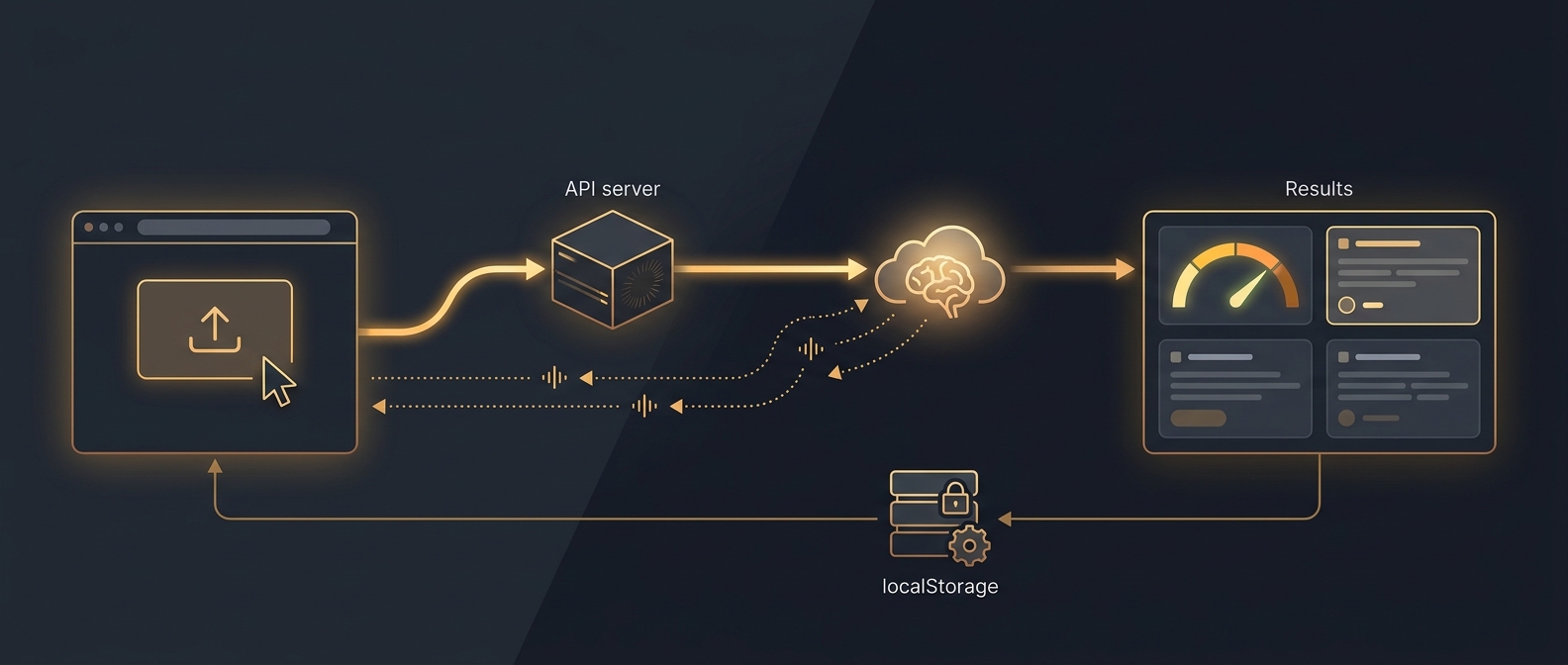
Figure 1.b — the original data-flow plate, kept for reference.
Overview Diagram
Mermaid source — the diagram above is generated from this
sequenceDiagram
  autonumber
  participant U as User
  participant B as Browser
  participant API as Next.js API
  participant Prov as Provider<br/>(Anthropic / OpenAI / Codex)
  participant Store as Neon + R2

  U->>B: Upload PDF / DOCX / paste
  B->>API: POST /api/document/extract
  API-->>B: { text, ocrUsed? }
  B->>API: POST /api/review (Accept: SSE)
  Note over API: validate · matter ownership
  API->>Prov: stream(skill prompt + submit_review tool)
  Prov-->>API: progress chunks
  API-->>B: SSE: progress
  Prov-->>API: tool_use: review JSON
  API->>Store: INSERT review · PUT original.docx
  API-->>B: SSE: result
  B->>U: Render verdict
Step 1: Document Upload
The user uploads a file via the FileUpload component, which supports three input methods:
| Method | How It Works |
|---|---|
| Drag and drop | User drags a file onto the drop zone |
| File picker | User clicks the upload area to open a native file dialog |
| Paste | User pastes text directly into the input area |
Accepted file types: .pdf, .docx, .txt, .md
If a file is uploaded (not pasted text), the client sends it to the extraction endpoint:
POST /api/document/extract
Content-Type: multipart/form-data
Body: { file: <uploaded file> }
Step 2: Server-Side Text Extraction
The route handler in /api/document/extract calls extractTextFromUpload() from document-extraction.ts.
Extraction Pipeline
File received
  │
  ├─ Get file extension
  ├─ Validate against SUPPORTED_LIVE_DOCUMENT_EXTENSIONS
  ├─ Convert File to Buffer
  ├─ Write to temporary directory
  │
  ├─ Switch on extension:
  │   ├─ .txt / .md → Raw UTF-8 read
  │   ├─ .docx → textutil (macOS) or python-docx fallback
  │   └─ .pdf → pdftotext (poppler) or pypdf fallback
  │             └─ If text is sparse → OCR fallback
  │
  ├─ Clean extracted text (remove null bytes, normalise line endings)
  ├─ Delete temporary directory
  └─ Return text to client
Extraction Methods by Format
| Format | Primary Method | Command | Fallback |
|---|---|---|---|
.txt, .md | Raw read | Buffer.toString("utf8") | None |
.docx | macOS textutil | /usr/bin/textutil -convert txt -stdout <path> | python3 -c "from docx import Document; ..." |
.pdf | poppler | pdftotext -layout <path> - | python3 -c "from pypdf import PdfReader; ..." |
Capability Detection
On first use, the server probes for available backends (textutil, pdftotext, python3, python-docx, pypdf) and caches the results. This avoids repeated subprocess calls to check availability.
OCR Fallback
If PDF text extraction returns sparse content (indicating a scanned document), shouldAttemptOcrForPdf() triggers performOcrFallback():
PDF text extraction → insufficient text?
  ├─ No  → return extracted text
  └─ Yes → performOcrFallback()
              ├─ Check OCR_PROVIDER env var
              ├─ Currently: OpenAI (sends image to GPT-4 Vision)
              └─ Returns OCR'd text
OCR requires additional configuration
OCR is only attempted when the OCR_PROVIDER (or AI_LEGAL_UK_OCR_PROVIDER) env var is set and the corresponding API key is available. Without configuration, scanned PDFs will return an error indicating insufficient extractable text.
Step 3: Skill Selection and Request
The user selects an analysis skill from the UI. The client constructs the analysis request:
POST /api/review
Content-Type: application/json
Accept: text/event-stream

{
  "text": "<extracted document text>",
  "skill": "legal-review",
  "apiKey": "sk-ant-..."
}
SSE vs JSON
The Accept: text/event-stream header triggers SSE streaming mode. Without it, the server falls back to a single buffered JSON response. The client always sends this header for the best user experience (real-time progress updates).
Step 4: Server Validation
The route handler in app/api/review/route.ts calls validateReviewRouteBody() from api-route-utils.ts. Four checks are performed in sequence:
| Check | Validation | Failure Response |
|---|---|---|
| API key | Must be present and start with sk- | 401 Unauthorized -- "Missing or invalid API key" |
| Skill | Must be in VALID_LIVE_REVIEW_SKILLS (the live-review allowlist defined in dashboard/lib/api-route-utils.ts) | 400 Bad Request -- "Invalid skill" |
| Text | Must be present and non-empty | 400 Bad Request -- "Missing or empty document text" |
| Length | Must not exceed MAX_LIVE_DOCUMENT_CHARS (50,000) | 413 Payload Too Large -- "Document is too large" |
// Validation result types
interface ReviewRouteValidationSuccess {
  ok: true;
  status: 200;
  apiKey: string;
  skill: ValidSkill;
  text: string;
}

interface ReviewRouteValidationFailure {
  ok: false;
  status: number;  // 400, 401, or 413
  error: string;
}
Step 5: Provider API Call
On successful validation, the server dispatches the request through the provider abstraction in dashboard/lib/model-providers/. The provider is selected from the prefix of the user's API key — Anthropic, OpenAI, or OpenAI Codex CLI — and each adapter exposes the same stream() contract.
For an Anthropic key, the resulting call looks like this:
const client = new Anthropic({ apiKey });

const stream = client.messages.stream({
  model: ANALYSIS_MODEL,               // env-configurable, default in lib/model-providers/anthropic.ts
  max_tokens: 8192,
  system: SKILL_PROMPTS[skill],        // Skill-specific system prompt
  tools: [REVIEW_TOOL],                // submit_review tool schema
  tool_choice: { type: "tool", name: "submit_review" },
  messages: [
    {
      role: "user",
      content: `Please analyse the following document and submit your structured review:\n\n${documentText}`,
    },
  ],
});
Key points:
tool_choice: { type: "tool", name: "submit_review" }forces the model to always call thesubmit_reviewtool, guaranteeing structured JSON outputmax_tokens: 8192allows sufficient space for detailed clause-by-clause analysis- System prompt defines the model's persona, assessment criteria, and legislation references specific to the selected skill
model: ANALYSIS_MODEL— the analysis model ID is read fromdashboard/lib/model-providers/anthropic.ts, configurable via theANALYSIS_MODELenv var. UseOPENAI_ANALYSIS_MODELto override the OpenAI provider model ID.- The user's API key is used directly -- the server holds no keys of its own
Step 6: SSE Streaming Events
During analysis, the streamSkillAnalysis() function emits SSE events to the client via a ReadableStream:
Progress Events
event: progress
data: {"stage":"Connecting to Claude...","percent":5}

event: progress
data: {"stage":"Analysing clauses...","percent":15}

event: progress
data: {"stage":"Reviewing provisions...","percent":30}

event: progress
data: {"stage":"Scoring risks...","percent":55}

event: progress
data: {"stage":"Finalising recommendations...","percent":75}

event: progress
data: {"stage":"Building results...","percent":90}

event: progress
data: {"stage":"Complete","percent":100}
Progress stages are mapped from the chunk count as the streaming response arrives:
| Percent Range | Stage Label |
|---|---|
| 5% | Connecting to Claude... |
| 15--25% | Analysing clauses... |
| 25--40% | Reviewing provisions... |
| 40--60% | Scoring risks... |
| 60--85% | Finalising recommendations... |
| 90% | Building results... |
| 100% | Complete |
Result Event
event: result
data: {"id":"abc123","type":"contract","score":72,"grade":"C","clauses":[...],...}
Error Event
event: error
data: {"error":"Rate limit exceeded. Please try again later."}
Step 7: Review Construction
When the stream completes, the server extracts the tool_use block from Claude's final message:
const toolBlock = finalMessage.content.find(
  (block): block is Anthropic.ToolUseBlock => block.type === "tool_use"
);
The buildReview() function constructs a typed Review object:
- Generates a UUID for the review (
crypto.randomUUID()) - Looks up the review type from
SKILL_TO_TYPEmapping - Extracts common fields:
documentName,summary,metadata - Switches on review type to build the specific variant:
| Review Type | Constructed Object | Key Fields |
|---|---|---|
contract | ContractReview | score, grade, clauses[], recommendations[] |
employment | EmploymentReview | score, grade, clauses[], era2025Dashboard[], equalityActMatrix[], obligations[], financialExposure |
ir35 | IR35Assessment | ir35Score, status, confidence, factors[], riskIndicators[], contractAmendments[], financialExposure |
compliance | ComplianceAudit | score, grade, frameworks[], checkItems[], recommendations[] |
Fallback Handling
If Claude does not return a tool_use block (e.g., returns plain text instead), buildFallbackReview() creates a minimal review object with default scores of 50 and the raw text as the summary. This ensures the UI always has a renderable result.
Skill-to-Type Mapping
| Skills | Review Type |
|---|---|
legal-review, legal-risks, legal-missing, legal-plain, legal-freelancer, legal-property, legal-corporate, legal-negotiate, legal-dispute, legal-benchmark, legal-due-diligence, legal-tenancy, legal-ip, legal-debt, legal-wills | contract |
legal-employment | employment |
legal-ir35 | ir35 |
legal-compliance, legal-aml, legal-consumer, legal-esg, legal-ai-compliance, legal-regulatory-calendar, legal-legislation-tracker, legal-gdpr, legal-immigration | compliance |
Step 8: Client-Side Storage
The client receives the result SSE event and:
- Parses the Review JSON
- Calls
saveReview()fromstorage.ts saveReview()callsmergeSavedReviews()to add the new review to the existing array (deduplicating by ID)- Serialises the updated array to
localStorageunder the keyai-legal-uk-reviews - Emits a
ai-legal-uk:storage-synccustom event for cross-tab synchronisation
// storage.ts
export function saveReview(review: Review): void {
  localStorage.setItem(
    KEYS.REVIEWS,
    JSON.stringify(mergeSavedReviews(getReviews(), review)),
  );
  emitStorageSync();
}
Step 9: Redirect and Rendering
After saving, the client redirects to /review/[id] where [id] is the review's UUID.
The review detail page (app/review/[id]/page.tsx) loads the review from localStorage and renders:
Common Elements (All Review Types)
| Component | What It Shows |
|---|---|
| Score gauge | Animated SVG circular display of the overall score (0--100). Colour: green (75+), amber (50--74), red (below 50). |
| Grade badge | Letter grade (A--F) prominently displayed next to the score. |
| Summary | Executive summary of findings with statute links (via linkify-statutes.tsx). |
| Metadata | Parties, effective date, governing law, total value, contract type. |
| Recommendations | Prioritised action items: critical (red), high (orange), medium (amber), low (green). Each shows current text and replacement text. |
Variant-Specific Sections
| Review Type | Additional Sections |
|---|---|
| ContractReview | Clause cards (expandable, each with risk score, issues, and recommendation), risk heatmap (interactive grid) |
| EmploymentReview | ERA 2025 compliance dashboard (pass/fail/warning per right), Equality Act matrix (status per protected characteristic), obligations table (employer/employee with triggers and deadlines), financial exposure breakdown |
| IR35Assessment | Status badge (inside/outside/borderline), confidence percentage, factor-by-factor analysis (8 CEST factors with scores and evidence), risk indicators list, contract amendment recommendations, financial exposure if caught inside IR35 |
| ComplianceAudit | Framework scores table (name, score, max, weight, status per framework), individual check items (framework, reference, check description, pass/fail/warning status, notes) |
Clause Card Detail
Each clause card in the ContractReview view is expandable and shows:
┌─────────────────────────────────────────┐
│ [Ref] Clause Title              [Risk: 72]
│ ─────────────────────────────────────── │
│ Clause text (collapsed by default)      │
│                                         │
│ Issues:                                 │
│  • Issue 1                              │
│  • Issue 2                              │
│                                         │
│ Recommendation: [text]          [Copy]  │
└─────────────────────────────────────────┘
Error Handling
Errors can occur at multiple points in the flow. Each is handled gracefully:
| Stage | Error | Handling |
|---|---|---|
| Upload | Unsupported file type | Client shows validation message before upload |
| Extraction | Backend unavailable | getMissingExtractionBackendMessage() returns a user-friendly message |
| Extraction | No extractable text (scanned PDF) | OCR fallback attempted; if that fails, error returned |
| Validation | Invalid API key | 401 with message "Missing or invalid API key" |
| Validation | Invalid skill | 400 with valid skill list |
| Validation | Document too large | 413 with character limit |
| API call | Authentication failure | mapReviewRouteError() maps to 401 |
| API call | Rate limit | mapReviewRouteError() maps to 429 |
| API call | Other Anthropic error | SSE error event with message |
| Streaming | Network interruption | Stream closes; client shows error state |
| Review build | No tool_use block | buildFallbackReview() creates minimal review with raw text |
Demo Mode Flow
When the dashboard is in demo mode (localStorage: ai-legal-uk-mode = "demo"), the flow is significantly shorter:
User selects skill → Client loads fixture from demo-data/ → Renders immediatelyNo API calls, no file upload to server, no SSE streaming. Demo fixtures are pre-built Review objects stored in dashboard/lib/demo-data/ that exercise all four review types and all UI components.
Tracked-changes export — recommendations to redlines
Once a review is rendered, the user can export an amended Word document with the recommendations applied as Word tracked changes. Two variants:
tracked-changes— the user's original.docxis round-tripped: every recommendation that matches verbatim is applied as a<w:ins>/<w:del>pair under the configured author; recommendations that don't match are preserved as Word comments. Byte-for-byte fidelity to the original.clean-draft— a fresh.docxis built from the recommendations alone via the pure-TS generator indashboard/lib/word-draft-server.ts(no Python shellout — required for Vercel serverless).
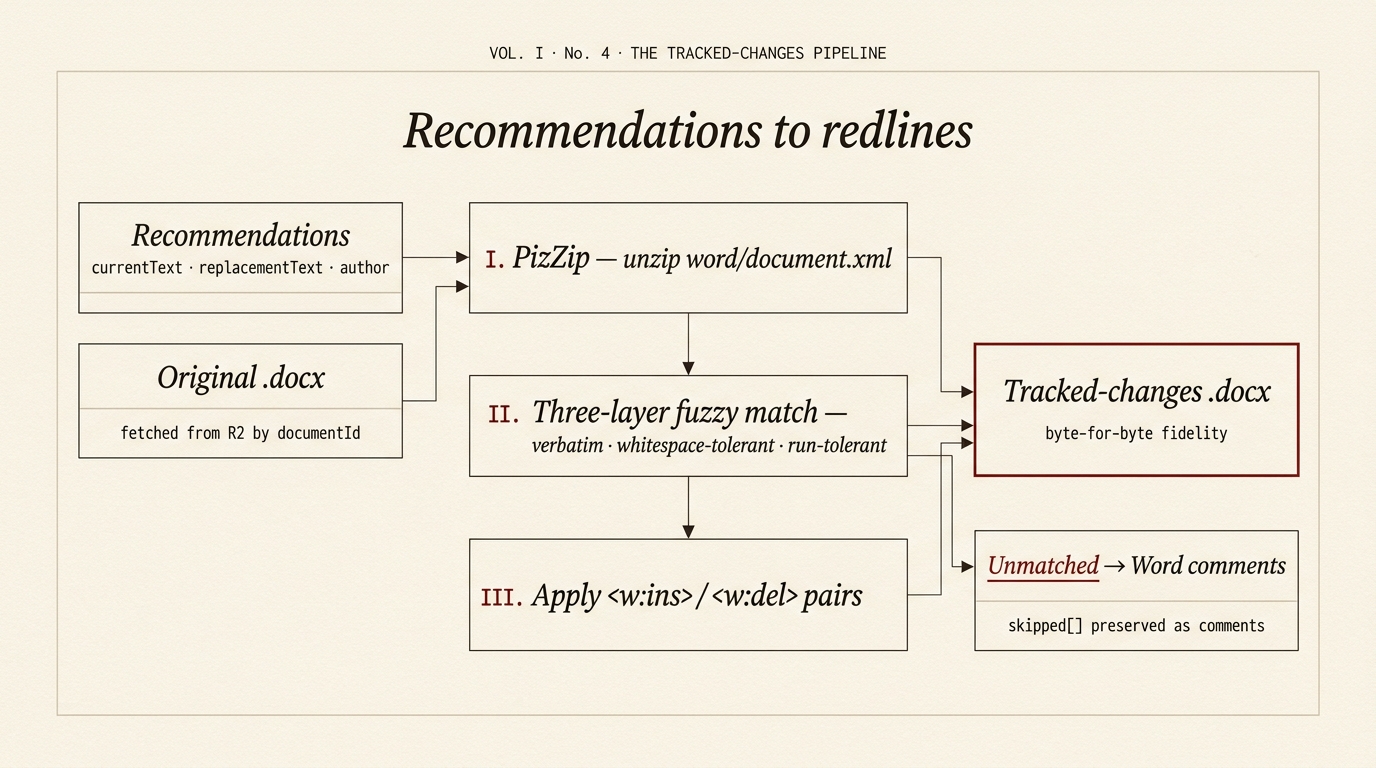
Mermaid source — the diagram above is generated from this
flowchart LR
REC["Recommendations<br/>currentText · replacementText · author"]
ORIG["Original .docx<br/>fetched from R2 by documentId"]
PIZ["I · PizZip<br/>unzip word/document.xml"]
MATCH["II · Three-layer fuzzy match<br/>verbatim · whitespace-tolerant · run-tolerant"]
APPLY["III · Apply<br/><w:ins> / <w:del> pairs"]
SKIP["Unmatched<br/>→ Word comments<br/>(skipped[])"]
OUT["Tracked-changes .docx<br/>byte-for-byte fidelity"]
REC --> MATCH
ORIG --> PIZ
PIZ --> APPLY
MATCH --> APPLY
MATCH -.-> SKIP
APPLY --> OUT
SKIP --> OUTThe pipeline lives in dashboard/lib/track-changes.ts and is exercised by the tracked-changes variant of app/api/review/word/route.ts. The route fetches the original .docx bytes from R2 by documentId, runs them through track-changes.ts, and streams the resulting .docx back to the browser. Tests live alongside in track-changes.test.ts.